
Seedream 5.5 vs Seedream 5.0

Seedream 5.5 vs Seedream 5.0: compare 5.5 with 5.0 Pro for repeated edits, native transparency and layer workflows, then decide whether to upgrade.
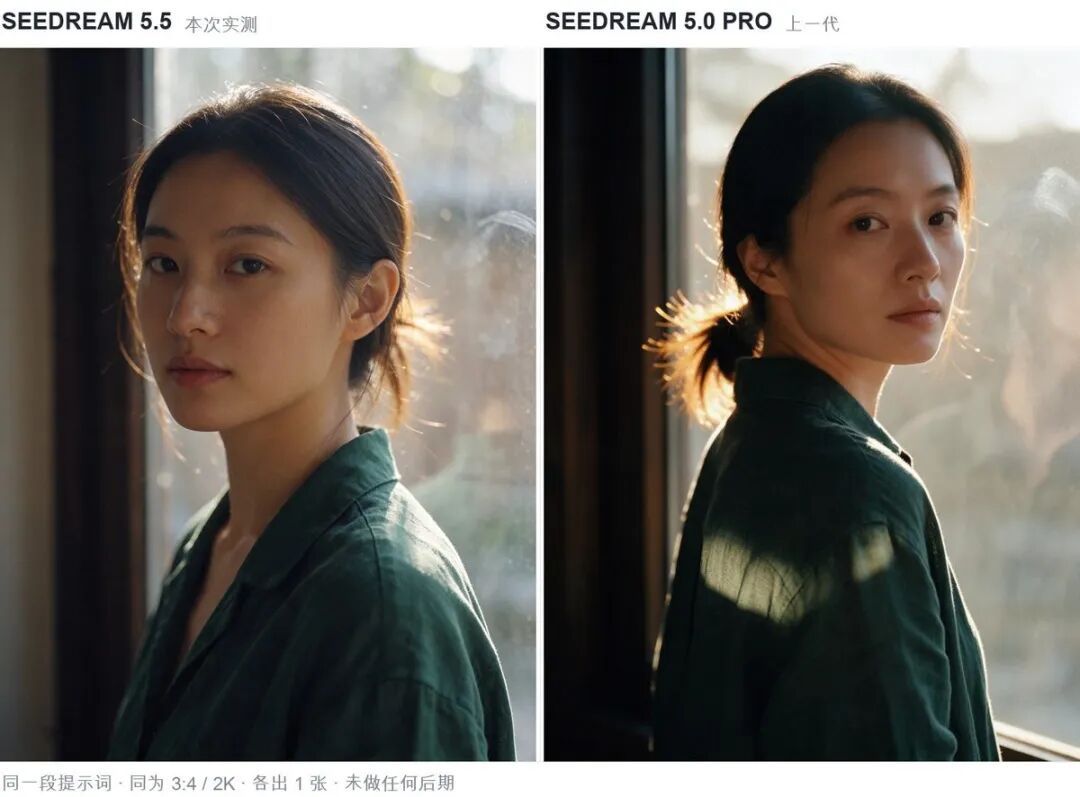
Seedream 5.5 is the more interesting choice when the same campaign image needs a new background, another prop and another round of edits. I'd keep Seedream 5.0 Pro for a design that needs its existing annotation tools or separated layers. The upgrade becomes compelling when the next request calls for 5.5's editing stability or native transparency.
This comparison draws on official documentation and uses 5.0 Pro, ByteDance's published predecessor baseline. Seedream 5.0 Lite is a separate variant.
Which Seedream 5.0 are we comparing?
Seedream 5.0 Pro is the relevant comparison because it is the model in ByteDance's 5.5 evaluation. As of November 9, 2026, the new release is Seedream 5.5. A 5.5 Pro version is announced for later.
The documented strengths point toward different assignments.
| Model | Editing emphasis | Transparency route | Working with individual assets |
|---|---|---|---|
| Seedream 5.5 | Long edit chains; preservation of untouched regions | Native RGBA from descriptions or references | Alpha describes transparency within a generated asset |
| Seedream 5.0 Pro | Annotation and sketch guidance | fal editing can preserve an input's alpha | fal layerize: up to 16 separated PNG layers |
The most consequential distinction is between continuing a composition, creating a transparent element and taking an existing design apart.
5.0 Lite separately documents deep thinking and online search. Pro has its own capabilities, including annotation guidance and layer separation. The shared 5.0 name doesn't transfer Lite's search features to Pro. I'd use the full model name wherever that difference affects the choice.
Upgrade for the revision that follows the revision
Seedream 5.5 has the clearest advantage in its documented emphasis on keeping an image intact through successive changes. ByteDance demonstrates 100 edits in a chain, feeding each result into the next request. It describes pixel-level preservation outside the edited regions. This is a vendor demonstration, not a universal guarantee of 100 successful changes.
Imagine a campaign composition with fixed product placement. First, the surrounding set changes. Then a prop needs replacing. The lighting gets another revision after that. By the final request, several earlier decisions are already part of the image you want to keep.

That is the work I'd move to 5.5. A model that carries those decisions forward is addressing the reason for editing the existing image. The chosen host needs to expose that continuing editing process for the recommendation to apply.
The upgrade matters less for a composition that is already finished and unlikely to change. In that case, Pro's acceptable result remains useful. A longer edit chain becomes valuable when the brief actually calls for another change.
Brand-sensitive work still needs an asset-specific decision. Keep the approved original as the default, then compare a representative revision against its logo, packaging and untouched regions. The vendor's sequence cannot establish whether your particular label survives. Useful checkpoints also let you return to an earlier direction if the creative request changes.
Create transparency, preserve it, or separate the design
Seedream 5.5's native RGBA generation is the stronger choice for creating a new transparent asset from a description or reference. Alpha adds transparency information to the image's color values, including partly transparent areas. That gives a translucent element something more useful than a plain background.
Suppose a ribbon is intended to sit across several layouts. Part of the underlying design should remain visible through it. Native alpha addresses that relationship from the start, so the requested result can include both the ribbon and its degree of transparency. The downloaded asset needs to retain that alpha for placement.

5.0 Pro already offers another route when the starting point has transparency. The fal edit API can preserve input alpha with its transparent option. It requires exactly one alpha-channel reference and PNG output. For a job that begins with a transparent asset, I'd keep that distinction in view before replacing an existing edit process.
A layered design asks something else of the tool. Imagine the ribbon is already part of a finished composition, and the next designer needs separate elements to rearrange. Native transparency alone doesn't establish that the whole composition can be taken apart.
The fal 5.0 Pro layerize endpoint returns a base image followed by up to 16 separated layers. Those layers use PNG. That is a substantive reason to retain an established Pro route when individual elements are the deliverable. It doesn't establish editable typography or a PSD file.
I would keep the working layerize operation until the chosen 5.5 service documents an equivalent output. Creating one transparent element, preserving existing alpha and separating a composition each solve a different part of the design job. A version number doesn't make them interchangeable.
Pro still has tools for directing the image
Seedream 5.0 Pro's documented capabilities include dense infographics, spatial annotations, sketch guidance and layer separation. It also describes photographic quality and native multilingual generation. Those features give an existing Pro process substance beyond familiarity.
Consider an assignment where the arrangement matters from the beginning. A sketch or spatial annotation can express the intended placement before the image becomes a composition worth revising. Later, separated assets may help another designer continue arranging it. Those needs remain even when a newer model emphasizes longer edit chains.
Pro's reference handling also belongs to the specific route already in use. The fal edit API accepts up to 10 images; if more are supplied, only the last 10 are used. That describes the Pro endpoint and cannot be carried over as a 5.5 specification.
I'd leave a sufficient Pro process in place for work whose results and outputs already fit. The strongest reason to change is a recurring need it doesn't address as well: continuing revisions or creating new transparent elements. Existing annotation and layer tools deserve weight in that decision.
Better text and realism strengthen the case
ByteDance reports improved quality and usability for 5.5 over 5.0 Pro across six professional use cases. Film/TV and office usability were more than twice the prior version in its evaluation. That result concerns the vendor's usability measure; it doesn't establish twice the generation speed or half the work for an assignment.
The release also describes more natural lighting, materials and skin, with less excessive gloss and overexposure. In a hypothetical product composition, a surface that looks too shiny can conflict with the intended material. Improved rendering matters when it helps that object read as intended. A deliberately stylized scene has a different target.
For text, ByteDance reports 0.4% severe corruption and 1.7% minor corruption in its Chinese/English evaluation, including dense small text. Those figures describe its evaluation rather than an expected error rate for your images. Both versions still call for human proofreading of final copy.
I'd put readable labels ahead of a more polished overall impression. A wrong product name can make an otherwise convincing image unusable. Better aggregate results support considering 5.5, while the final words still need someone to read them.
When should you switch to Seedream 5.5?
Switch to Seedream 5.5 for a composition that will keep evolving or a new element that needs native transparency. Those are specific additions with a clear place in creative work, provided the chosen platform supports the required editing and output.
Keep Pro's established layer-based process when separate assets are needed and 5.5 has no documented equivalent on that service. An alpha-preserving Pro edit can also remain sufficient when the job starts with a transparent reference. Ordinary one-shot work has less reason to move if the existing result already fits.
My preference is to let the next difficult assignment decide where the upgrade belongs. Continuing revisions can move to 5.5 while separated-layer work stays with Pro. That gives the new model a useful role without discarding tools the design still needs.
About the author
Neo James
Founder of ReelDanceNeo James is the founder of ReelDance and specializes in AI video generation products. He brings years of experience building AIGC products, with a focus on practical creative workflows.