
GPT Image 2.6 Review: Flare, Sunburst, and Three Practical Creative Tasks

A documentation-based review of GPT Image 2.6, with Flare vs Sunburst choices, three creative tasks, editing controls, and the cost of usable results.
The short answer: Flare for iteration, Sunburst for demanding edits
Start with Flare for quick creative exploration. Choose Sunburst when product detail or layout decides whether an image is usable. I'd put a readable bottle label ahead of a dramatic background. A beautiful campaign image fails if it changes the product someone is buying.
This review uses OpenAI's documentation and official examples checked November 5, 2026, without hands-on generation tests. The choice comes down to the deliverable: product artwork, a small animated loop, or a sketch proposal. Flare favors response time; Sunburst is the stronger starting choice for demanding revisions. Keep approved originals when the job requires guaranteed pixel preservation. Keep dimensional approval in the design process.
What changed in GPT Image 2.6?
OpenAI's November 4 announcement claims 50% faster generation and says Flare can generate in as little as six seconds at low quality. Those figures come from OpenAI, without measured turnaround times for the tasks here. The low-quality condition matters. For detailed final artwork, don't build a delivery schedule around the six-second claim.
The same announcement positions Flare around improved layouts for posters and product imagery. It describes Sunburst's gains in detail and consistency across edits at medium and high quality. Use those distinctions to assign each task. Sunburst's positioning gives it a reason to handle demanding edits, without making it the default for every draft.
The image generation guide also documents GIF output, markup, SVG, and a separate complexity control. Each addresses a different problem: the output format, the location of a revision, or the amount of planning. Choose the control that fits the request. You still need to say what the finished asset must preserve.
Compare Flare and Sunburst on one creative brief
Imagine a small product campaign needing a bottle image, a waving mascot, and a sketch-based display concept. Keep the brand requirements fixed across all three. The bottle must remain recognizable, the mascot needs one readable action, and the display must follow the supplied layout.
Write those requirements before comparing variants, so the same brief governs every result. A striking background can distract from a changed label. A lively mascot can hide an unreadable action. Judge each image against the requested result, and keep the requirements fixed throughout the comparison.
The official prompting guide recommends choosing between response time and demanding detail, layout, or edit accuracy. I'd assign each deliverable separately, even when all three belong to the same campaign.
The table puts each variant's recommended starting task beside its shared controls, outputs, and price unit.
| Variant | Exact API ID | Starting task | Shared controls and outputs | Image output price unit |
|---|---|---|---|---|
| Flare | gpt-image-2.6-flare | Fast concept exploration | Still edits; GIF generation; SVG; quality/complexity | $30/1M tokens; inputs extra |
| Sunburst | gpt-image-2.6-sunburst | Demanding detail, layout, edits | Still edits; GIF generation; SVG; quality/complexity | $30/1M tokens; inputs extra |
Start with the variant suited to the hardest requirement in the brief; the shared features alone don't settle the choice.
The Flare and Sunburst model cards list the same image output token rate. That does not establish the same price per image. Text and image inputs cost extra, and the number of output tokens matters.
For the loop, use POST /v1/images/generations, where GIF output is documented. Keep GIF output off the image edits endpoint. Although both models can edit images, that capability does not establish an uploaded-reference animation workflow through an edits request. The endpoint matters as much as the variant.
Editing controls that help keep a revision focused
For a focused change, use markup and start with low complexity. The markup instructions call for a separate transparent PNG overlay matching the first input's dimensions. Use it to point out the requested change, and review the surrounding pixels in the result.
OpenAI's kitchen example marks a striped vase for a cobalt-blue recolor. The request asks to remove the red circle while retaining the vase shape, stems, and kitchen. The guide shows both Flare and Sunburst results.
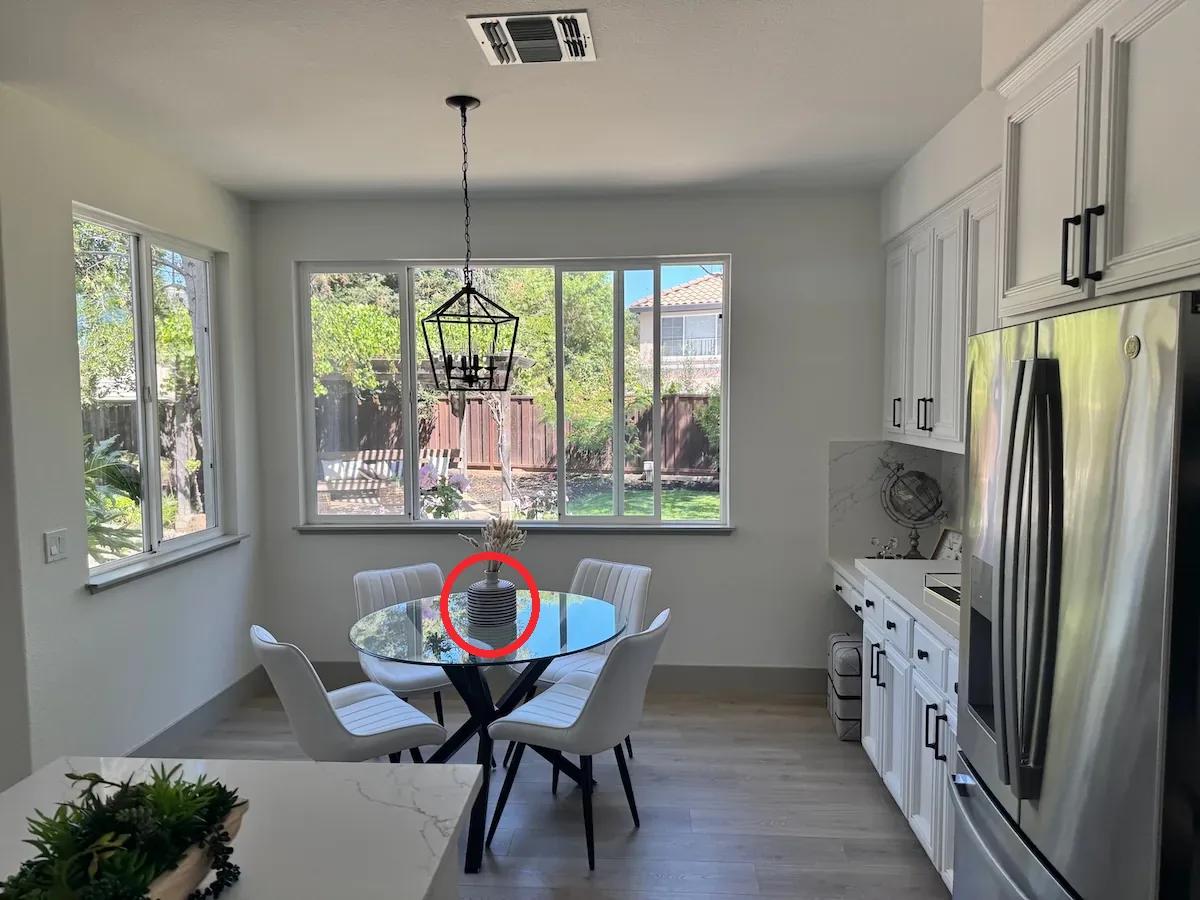
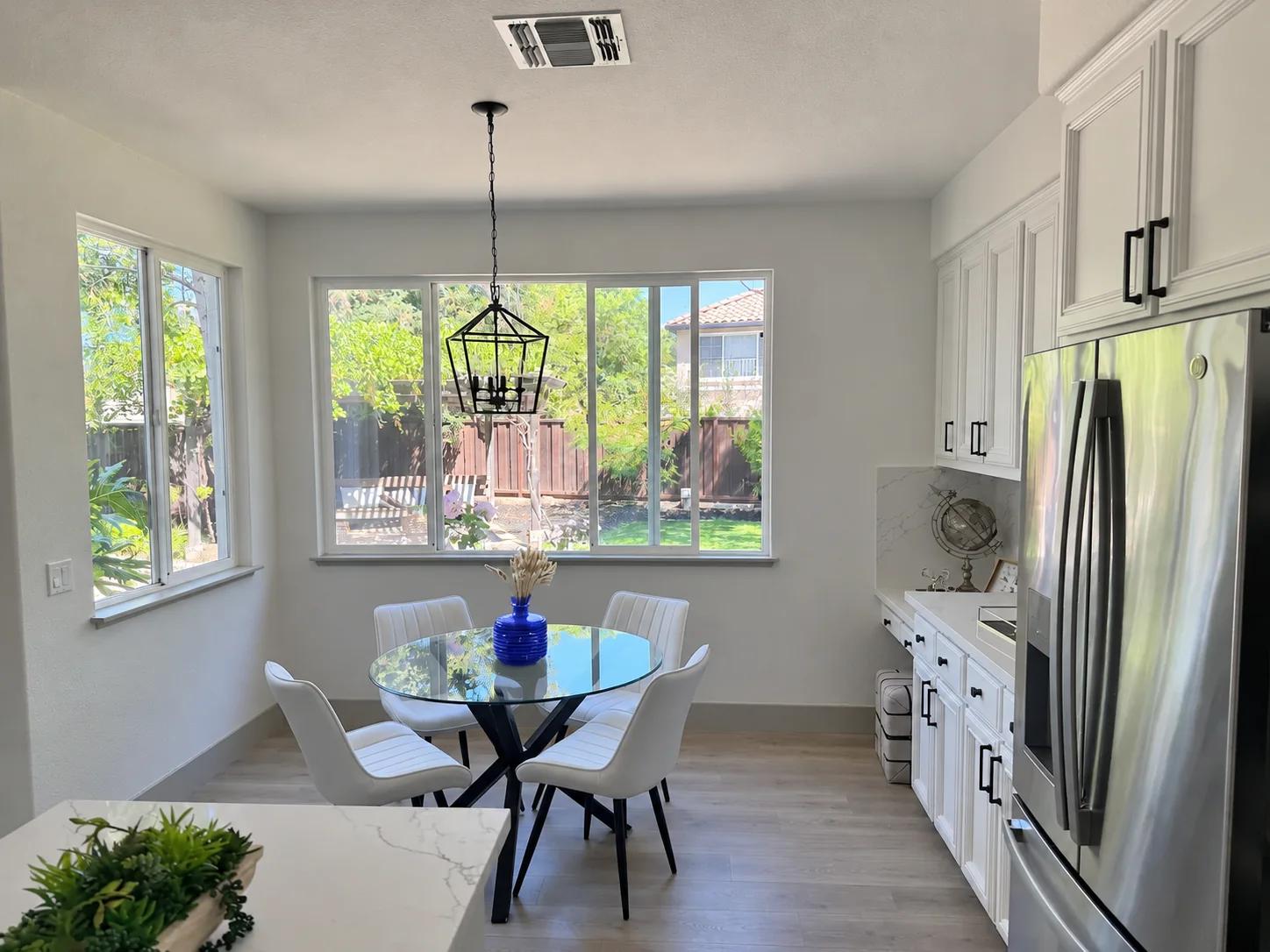
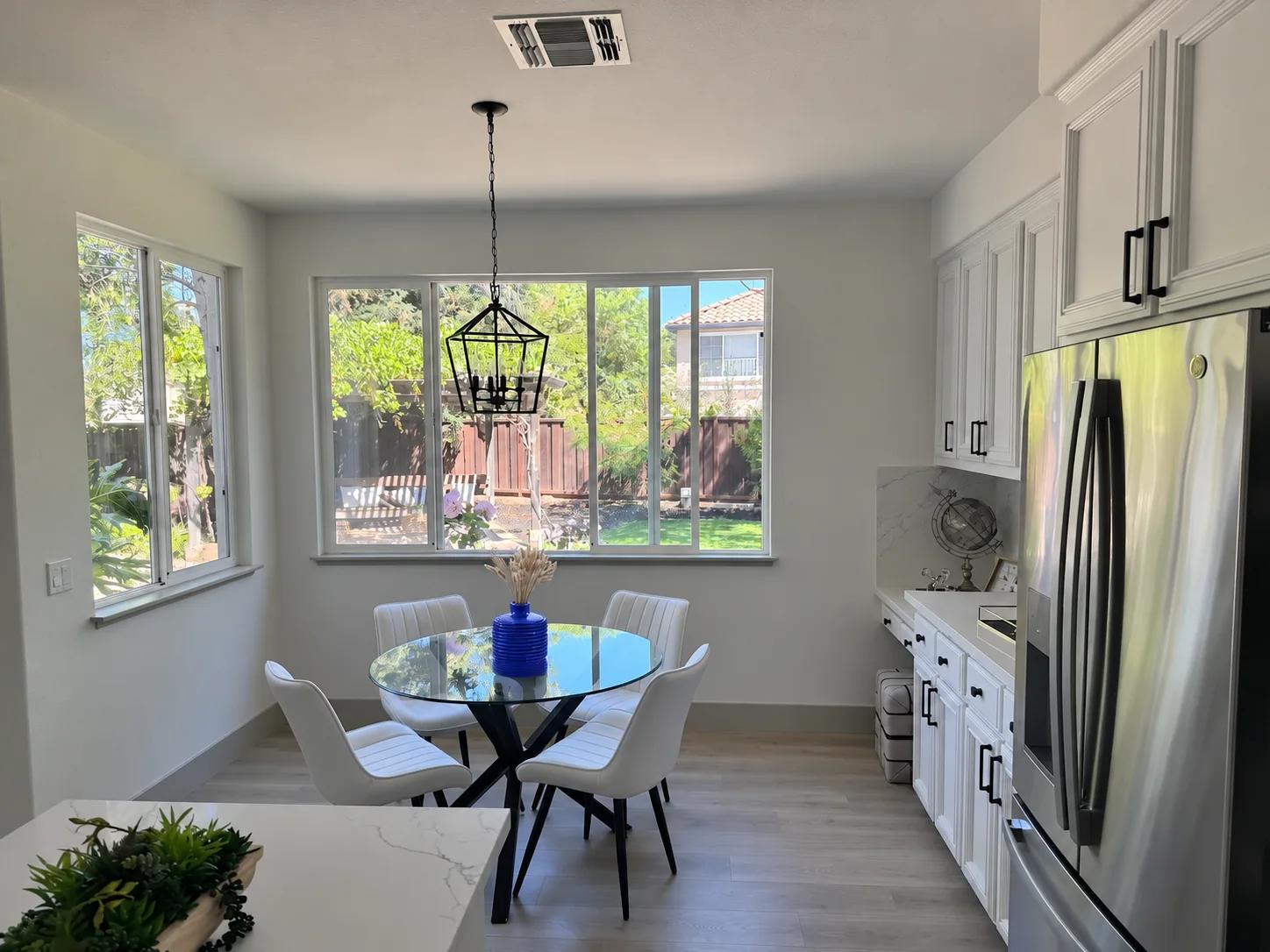
OpenAI official example: marked input, then GPT Image 2.6 Flare and Sunburst outputs. Source: image prompting guide.
I'd judge these revisions by what the request asks to preserve: vase shape, stems, and surrounding kitchen. Compare those details before judging the blue. Markup communicates the requested change, without guaranteeing that everything outside the mark stays identical.
Quality and complexity serve different purposes. Quality controls rendering detail; complexity controls planning, with low, medium, and high settings. The default complexity is high. OpenAI recommends low for most edits and medium or high for many elements or constraints. More planning may add latency or unwanted changes.
Keep complexity low for the vase recolor. Raise it when several spatial relationships need to be resolved together. Set quality according to the detail the final image needs. Even with more planning, spell out the objects, positions, and surrounding furniture that must stay in place.
Assess the product detail and motion that matter
The product sequence below puts the package through changing campaign settings. Does it still represent the approved product? Judge each revision against the original, even when the seasonal scene looks compelling. The same product requirements apply throughout.
For product artwork, give the label and geometry priority over atmosphere. Check the wording, cap shape, bottle proportions, and placement of recognizable features. Keep the approved original until an output passes those checks. A new background is useful only when the product remains acceptable.
Motion needs a different review. Watch the join between the last and first frames, then inspect the character throughout the loop. A mascot's hand should remain readable during a wave. An extra finger, a changing sleeve, or a sudden jump at the seam is a reason to reject that asset. These are acceptance criteria, not failures measured in this review.
Rank corrections by their effect on the message. A wrong product name takes priority over a shadow; an unclear gesture takes priority over decorative motion. Settle those problems before polishing the atmosphere. The asset has to communicate its intended message before a prettier variation earns approval.
Sketch proposals need another boundary. The official guidance describes preserving layout and perspective while specifying materials and light. Treat that as concept development. A convincing render still needs its object count, perspective, and circulation checked against the sketch before presentation.
Which model fits your creative task?
A product image that needs precise revisions
Start with Sunburst at medium or high quality when labels, layout, or detailed revisions determine acceptance. Use Flare for exploring background directions before those demands dominate. I'd let the product's smallest important detail set the quality requirement. Early background ideas can stay exploratory until the product details become the deciding constraint.
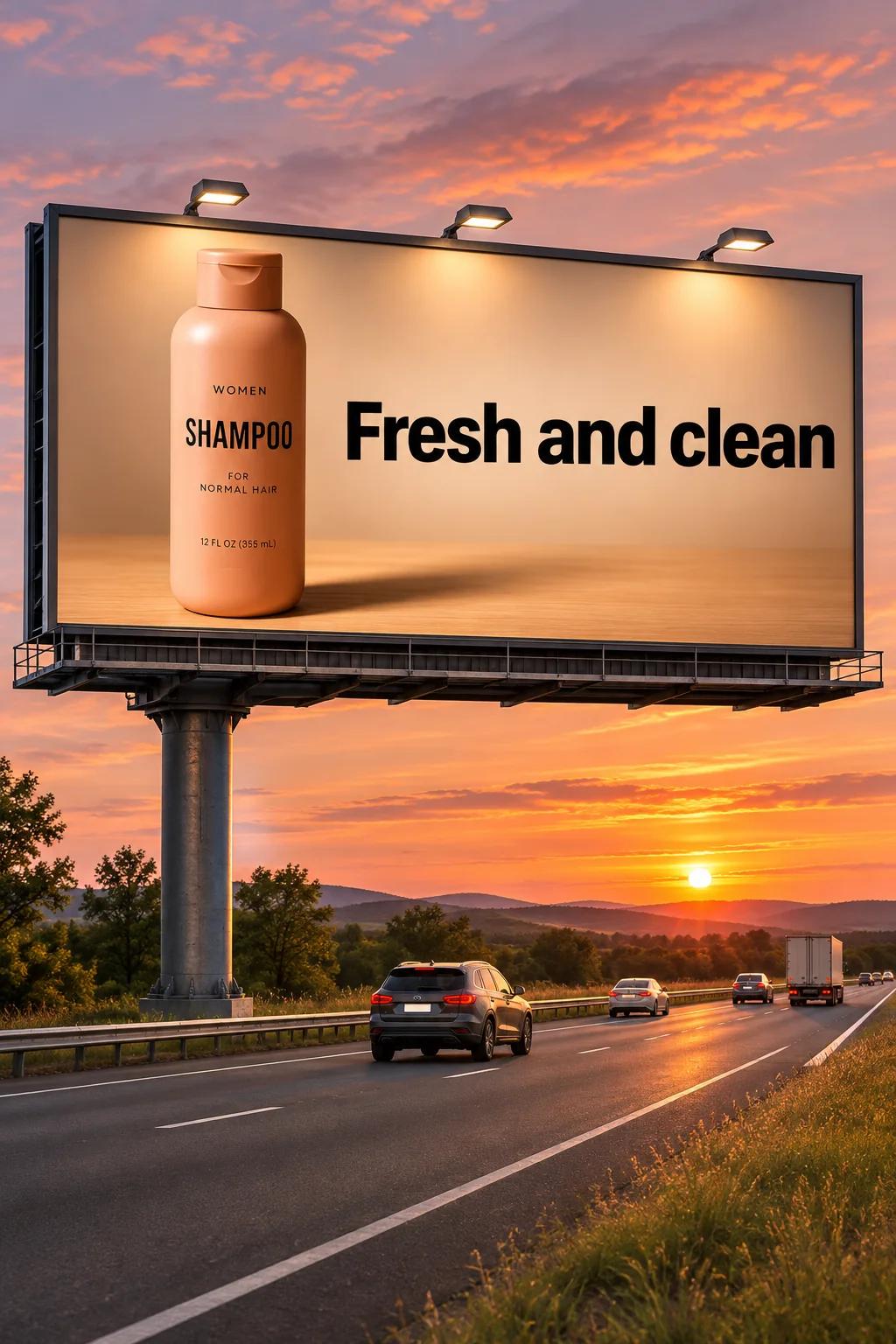
OpenAI's campaign example starts with a shampoo photograph. Sunburst places it in a sunset billboard scene, then revises the scene for winter.

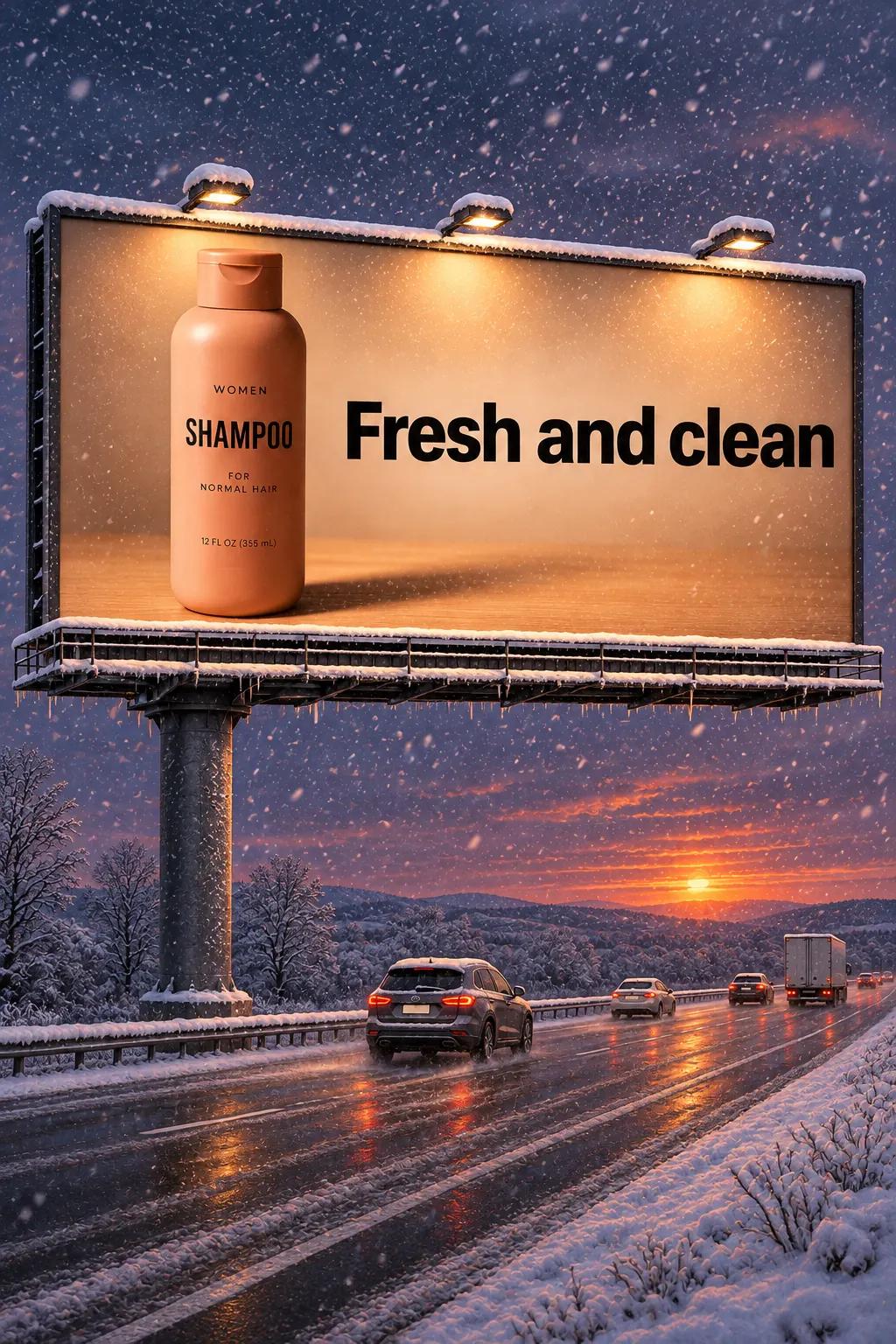
OpenAI official example: shampoo input, then GPT Image 2.6 Sunburst sunset and winter outputs. Source: image prompting guide.
Compare the bottle and label across the sequence at a useful viewing size. Does the campaign still represent the approved product? Apply the same standard to your own asset, and keep its original until the replacement passes. An attractive backdrop cannot settle product fidelity.
Budget around accepted images. Divide generation spend by the number of assets that meet the brief, including rejected attempts in that spend. Track cleanup minutes separately. If labor belongs in a dollar total, assign it an explicit rate first. Mixing minutes directly into API charges makes the comparison meaningless.
Use the same label requirement throughout the cost comparison. Relaxing it halfway through changes the job being priced, even if more results appear usable. Record whether each asset is ready to use or still needs work. Count it as accepted only when it meets the original brief.
The shared $30 output-token rate cannot tell you which model produces the cheaper accepted asset. I'd favor the route that meets the requirements with less total revision work. Establish savings from actual usage and acceptance records before calling either variant cheaper.
A mascot GIF with one readable action
Use Flare as the speed-first default for a simple generated loop. Choose Sunburst when detailed character accuracy becomes the deciding requirement. Keep the action small: one wave, a blink, or a gentle bounce. A clear motion deserves priority over several competing gestures.
OpenAI's monkey-lantern example uses nine frames at 200 milliseconds each, producing a 1.8-second Sunburst GIF.

OpenAI official example: GPT Image 2.6 Sunburst GIF output. Source: image prompting guide.
Use the example to assess whether a small action communicates clearly. A branded mascot still needs its own character checks before approval.
For a proposed waving mascot, describe the character, fixed framing, and single action in the generation request. I'd avoid combining a wave, a turn, and a jump in that first brief. Inspect the exported GIF's seam and character details before using it. Keep this task on the documented generations endpoint; don't treat it as an uploaded-image animation recipe.
A sketch proposal that preserves the layout
Start with Sunburst when the supplied layout is the main constraint. Its emphasis on detail and layout makes it the sensible first choice when several relationships in the sketch must survive the render. Use Flare when the goal is broad visual exploration and those relationships are still flexible.
In OpenAI's valley example, Sunburst turns a line drawing into a photorealistic scene. The landscape input becomes a portrait output.
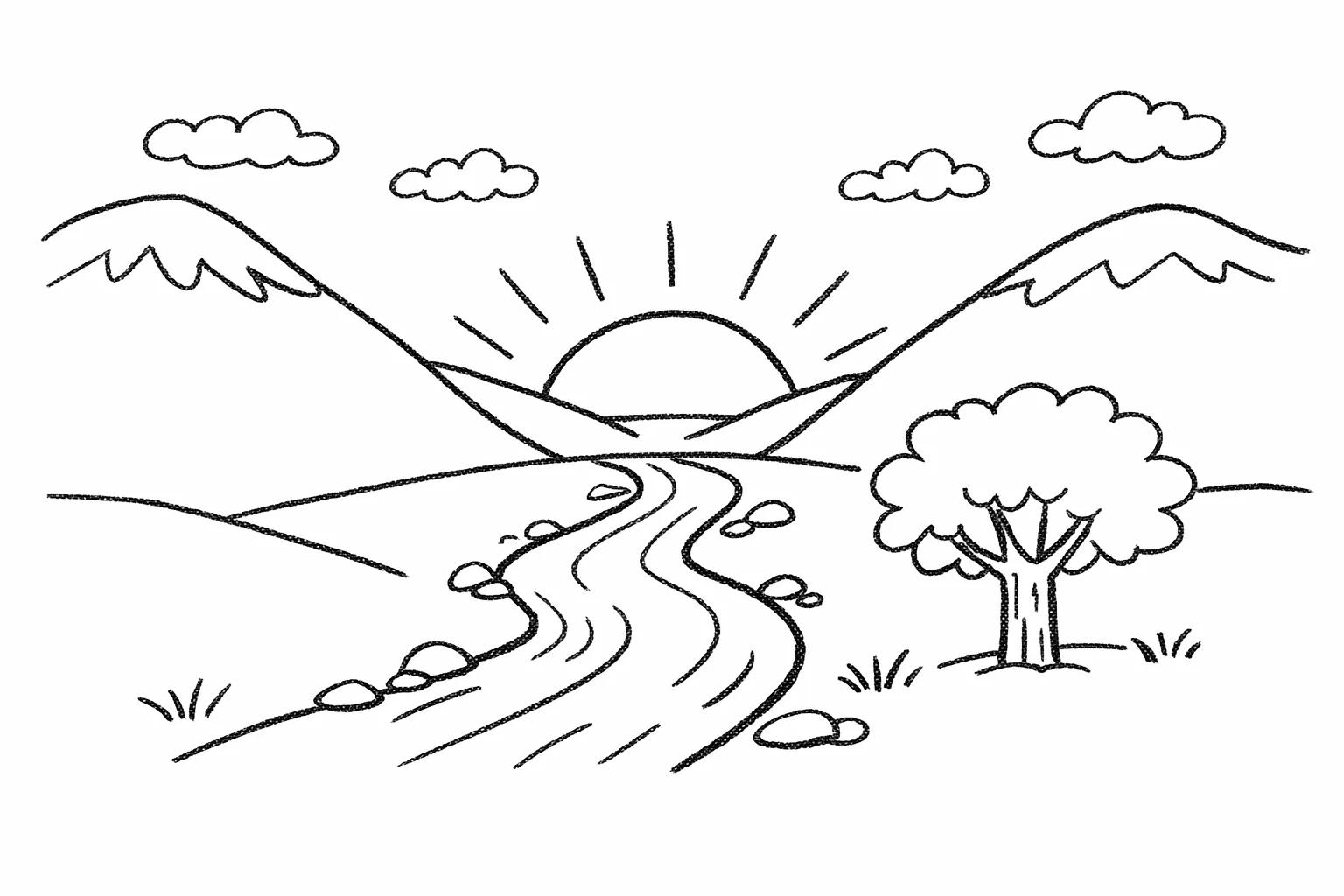

OpenAI official example: valley drawing input and GPT Image 2.6 Sunburst output. Source: image prompting guide.
The change in framing makes composition worth a closer look. This pair cannot establish perfectly preserved geometry. In your own brief, separate layout instructions from appearance instructions. A material reference can describe finishes and lighting; review the result against the relationships shown in the sketch.
I'd prioritize the layout review before judging whether the lighting looks persuasive. Count the major objects, compare their positions, and check that circulation remains open. If the brief calls for three display bays, an attractive fourth bay changes the proposal. Keep dimensional approval in the appropriate design process.
Conclusion
If quick creative iteration is the main job, start with Flare. If detail, layout, or precise product revisions decide whether the result is usable, start with Sunburst. I'd keep the approved product original until its replacement passes the label and geometry requirements. A better-looking scene earns no exception.
Frequently asked questions
Can GPT Image 2.6 GIFs have transparent backgrounds?
Don't assume they can. The current prompting guide documents transparent PNG/WebP and SVG, but does not establish transparent GIF support. Choose a documented transparent still format, or an animation workflow whose transparency support you have separately confirmed.
Does the Responses API image tool support 2.6 GIF output?
Use the documented Image API generations route for GIF output. The generation guide does not establish equivalent GIF output through the Responses image tool. Don't assume the two API surfaces expose identical formats.
Does turning off model training delete my chats?
No. Turning off model training and deleting chats are separate actions in ChatGPT's data controls. If you want a conversation deleted, take that action separately rather than relying on the training setting.
What happens if I submit feedback after opting out of training?
The conversation associated with voluntarily submitted feedback may be used to train models, even after you opt out. OpenAI explains this exception in its data controls FAQ. Consider the uploaded assets and conversation before submitting feedback.
About the author
Neo James
Founder of ReelDanceNeo James is the founder of ReelDance and specializes in AI video generation products. He brings years of experience building AIGC products, with a focus on practical creative workflows.